Cypress Operator's Guide
Cypress 101
Cypress is a friendly, frontend testing tool that resembles legacy testing tools like Selenium. It can test anything that runs in a browser. Published tests may be small and omit any dependencies.
What does Cypress Offer?
Cypress comes complete with a built-in test runner, a Cloud environment, video recordings and test replays to closely examine reported failures.
Test Replays
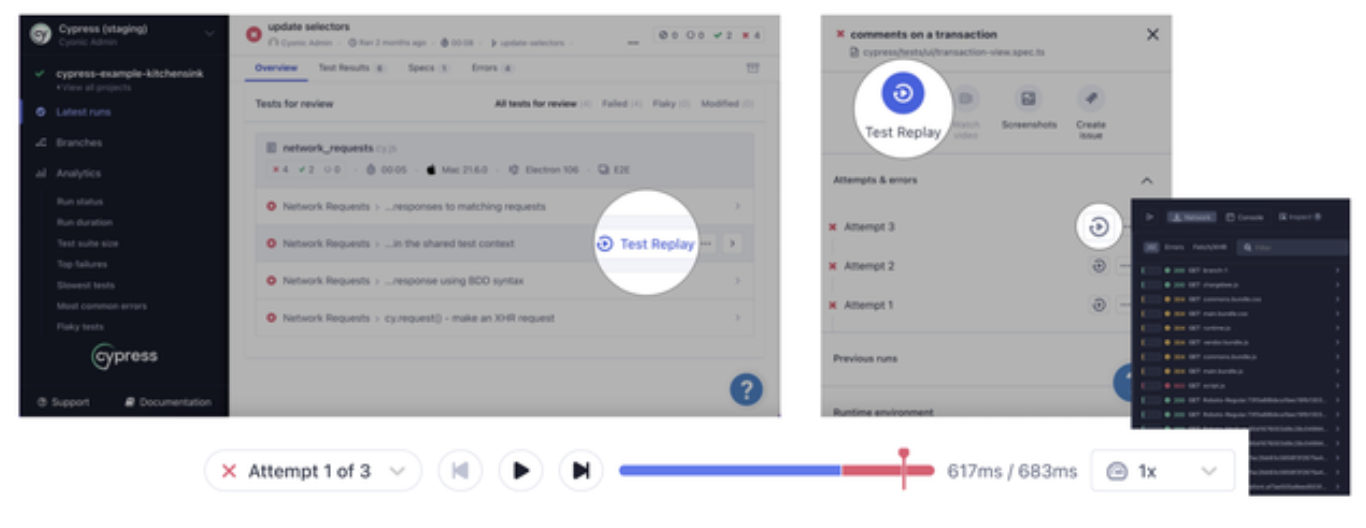
With Test Replay, Cypress Cloud regenerates the entire UI for viewing the run and debugging CI failures. You can:
- watch the simulated version of the app in realtime
- time travel, within the frontend simulator, second by second
- pause at the point-in-time where your test failed
If your test results are recorded to Cypress Cloud you do not have to worry about manually reproducing bugs. You can replay the failure directly in the Cloud.
Cypress and Xpaths
Xpaths are usually long, “stringified” locators used to traverse the DOM tree that composes your website. The problem is that they are highly sensitive to change, meaning that the removal of one node in the DOM tree will likely result in an invalid xpath. This will immediately fail your tests.
Cypress does not natively support xpaths. The cypress-xpath npm package is no longer maintained by the author and is not Cypress-supported.
Refrain from using xpaths when possible.
Instead use chains composed of Cypress methods to achieve the desired result. Read more about Cypress chains in my Cheatsheet.
Cypress and Dependencies
Cypress tests are most effective when written with little to no dependencies between. By default, Cypress resets state between tests, unless otherwise specified in the Cypress config file. Dependencies between tests create distance between tests and assertions. The closer the assertion lives to its test, the faster the resolution.
💡 Protip state is reset between Cypress tests by default (I.e. between it blocks). To offset, set testIsolation: false in your Cypress config file.
Cypress Chains
Cypress chains are commands strung together to execute sequentially. Chains are a more readable and reliable alternative to using xpath.
Cypress and iFrames
There is no easy application of working with iframes in Cypress. Most of the cy DOM traversal commands hard stop the moment they hit #document node inside the iframe. Working with iframes will require some custom code.